Màn Hình Xanh ChếT Giả XP

A problem has been detected and windows has been shut down to prevent damage to your computer.
The problem seems to be caused by the following file: SPCMDCON.SYS PAGE_FAULT_IN_NONPAGED_AREA
If this is the first time you've seen this stop error screen, restart your computer. If this screen appears again, follow these steps:
Check to make sure any new hardware or software is properly installed. If this is a new installation, ask your hardware or software manufacturer for any windows updates you might need.
If problems continue, disable or remove any newly installed hardware or software. Disable BIOS memory options such as caching or shadowing. If you need to use Safe Mode to remove or disable components, restart your computer, press F8 to select Advanced startup options, and then select Safe Mode.
Technical information:
*** STOP: 0x00000050 (OXFD3094C2, 0x00000001, 0xFBFE7617, 0x00000000)
*** SPCMDCON. SYS - Address FBFE7617 base at FBFE5000, Datestamp 3d6dd67c
 Buy me a Coffee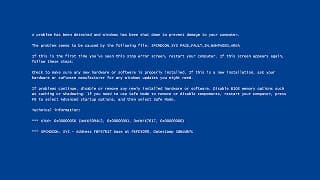




Cài đặt

There is no setting for this tool
Cài đặt
There is no setting for this tool
0 / 5 -
Màu Đơn Sắc
Cập Nhật Giả





Bảo Vệ Màn Hình







Cập nhật vào Invalid Date
Tác giả Nadiba Rahman

Người duyệt Mrinmoy Roy

Chia sẻ bài viết này
URL copied!